New Release 1.0

Privacy for your messages,
visible only when you want.

The essential Chrome extension for WhatsApp Web. Blur messages, media, and contacts automatically. Reveal them instantly with a simple hover.

Free β€’ No Data Collection β€’ Open Source

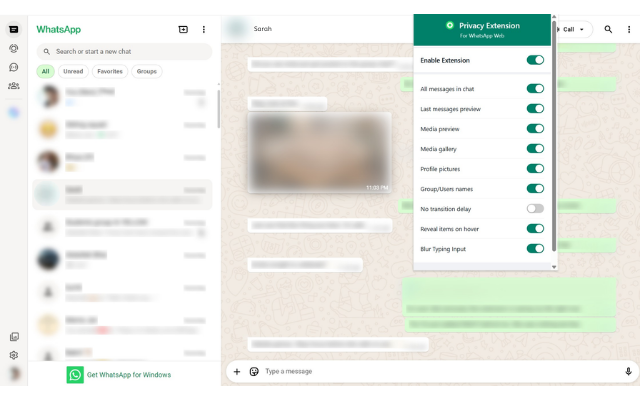
WhatsApp Privacy Extension Screenshot

See it in Action

Watch how easy it is to protect your privacy.

Everything you need for Privacy

Designed for open offices, classrooms, and public spaces.

πŸ’¬

Blur Messages

Hide conversation text automatically. Only read what you want, when you want, by simply hovering over it.

πŸ–ΌοΈ

Hide Media

Stop prying eyes from seeing your photos and videos. Images are blurred until you decide to reveal them.

πŸ‘€

Anonymous Contacts

Blur contact names and profile pictures. Keep the identities of who you are talking to completely private.

⚑

Instant Toggle

Need to show your screen? Toggle privacy on or off instantly with a global switch or keyboard shortcut.

Why Choose Us?

See how we stack up against the rest.

Feature WhatsApp Privacy Extension Other Extensions
Blur Messages βœ… βœ…
Hide Media βœ… βœ…
Profile Picture Blur βœ… ❌
Group Name Blur βœ… ❌
Typing Blur βœ… ❌
No Transition Delay βœ… ❌

What Users Are Saying

Real feedback from the Chrome Web Store.

⭐⭐⭐⭐⭐

The media blur is a lifesaver. I often get personal photos in chats, and now I don't have to worry about opening WhatsApp at work. One hover and I can see it. Perfect.

Sarah J.

⭐⭐⭐⭐⭐

I love that I can hide contact names. It's not just about the messages; sometimes I don't want people to even know WHO I'm talking to. This extension nails that privacy aspect.

Dev_Mike

⭐⭐⭐⭐⭐

The global toggle with a shortcut is genius. When my boss walks by, I just hit the switch and everything is safe. No transitions, instant blur. Highly recommend.

Alex T.

β­β­β­β­β˜†

Finally a privacy extension that doesn't make WhatsApp laggy. The typing input blur is a nice touch tooβ€”people can't even see what I'm drafting.

Prya22

⭐⭐⭐⭐⭐

I use the 'No Transition Delay' setting because I hate waiting for the unblur animation. It feels super snappy. Best one I've used so far.

NomadWorker

⭐⭐⭐⭐⭐

Simple and effective. I keep Profile Pictures blurred by default so my screen just looks like a bunch of grey generic blocks. Zero distractions.

Chris W.